
From Legacy Query to Optimized Query: Our Refactoring Approach
Most applications start fast because the dataset is small. As the system grows and millions of rows accumulate, queries that once executed instantly begin to slow down, and over the period user starts noticing:
· Slower GUI
· Reports that ran instantly now take minutes
· Time Out Errors from APIs
· Latency in daily activities
What works on thousands of rows often breaks at millions.
In this article we will discuss:
· How to identify slow queries
· Why MySQL queries become slower over time
· How to fix them
1. How to Identify Slow Queries
Using the Performance Schema (Advanced)
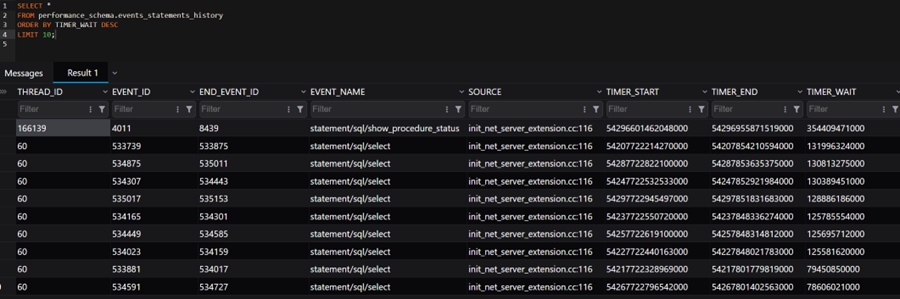
MySQL provides a table showing queries executed recently.
SELECT *
FROM performance_schema.events_statements_history
ORDER BY TIMER_WAIT DESC
LIMIT 10;
This helps identify queries taking the most time.
Using EXPLAIN
EXPLAIN in MySQL is one of the most important tools for query optimization.It tells you how MySQL plans to execute your query, not the actual result.
EXPLAIN
SELECT *
FROM trades
WHERE accountId = 1001;
MySQL shows:
1. How it will fetch data
2. Which indexes it will use
3. Join order
4. Estimated rows scanned
It does NOT execute the query, just shows the execution plan.
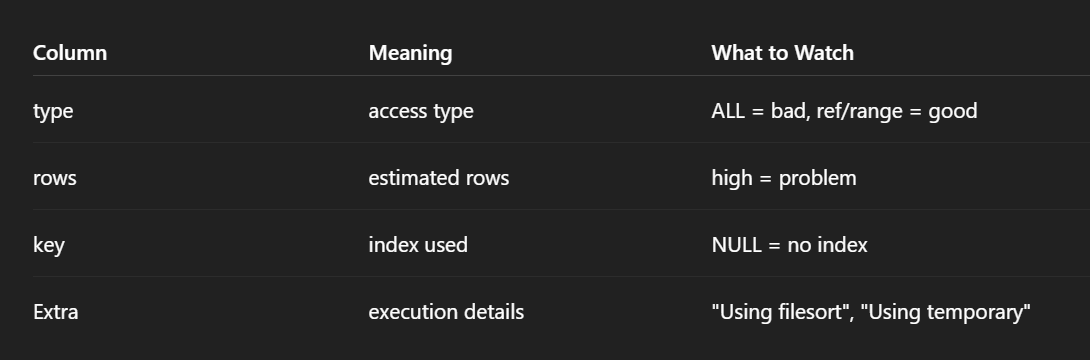
Important columns include type, key, rows, and Extra.
Using EXPLAIN ANALYZE
EXPLAIN ANALYZE is used to execute a query and show its real execution plan with actual performance data.
EXPLAIN ANALYZE
SELECT *
FROM trades
WHERE accountId = 1001;
EXPLAIN ANALYZE executes the query and returns:
- actual execution time
- rows processed at each step
- loops executed
- join operations
- index usage
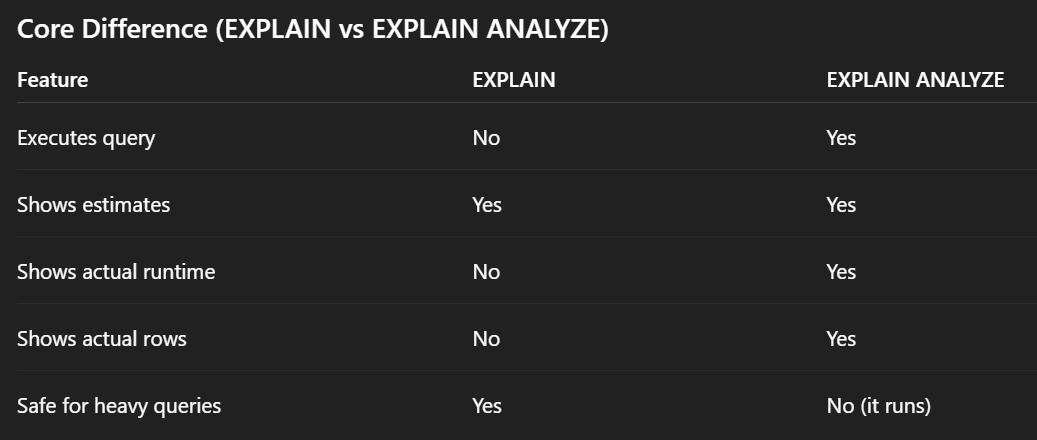
EXPLAIN helps you estimate the execution plan, whereas EXPLAIN ANALYZE validates it with actual runtime and row data.
Use APM Tools (Best for Production APIs)
Application Performance Monitoring tools automatically detect slowness in APIs, database queries and cause of latency.
Popular tools:
- New Relic
- Datadog
- Elastic APM
- Dynatrace
2. Why Queries Become Slower Over Time
Increase in data
The most common reason for query slowness is data growth. A query scanning 10,000 rows would behave very differently from one scanning 10 million rows and absence of indexes make it worse.
Missing or Inefficient Indexes or Wrong Indexes
Not having a proper index on tables would also make a query slow even for simple conditions as DB scans the entire table. Also using the wrong index type in MySQL can significantly hurt performance. Many slow queries are not caused by missing indexes but by indexes that don't match the query pattern.
Wrong index is often worse than no index.
SELECT *
FROM trades
WHERE accountId = 100 AND tradeDate >= '2026-01-01';
Adding proper indexes on frequently filtered columns helps in improving performance:
CREATE INDEX idx_trades_account_date ON trades(accountId, tradeDate);
Increased Concurrency
As applications grow, more users start using it, eventually more queries run simultaneously, increasing waiting, locking and I/O pressure. In most systems I’ve worked on, slow queries started appearing once tables crossed a few million rows.
Poor Query Patterns
Certain query patterns degrade performance instantly, like:
· Using functions on indexed columns
· Fetching all the columns
· Sorting/ filtering on non-indexed columns
· Correlated queries, etc.
2.What To Do After Identifying a Slow Query
Add Proper Indexes
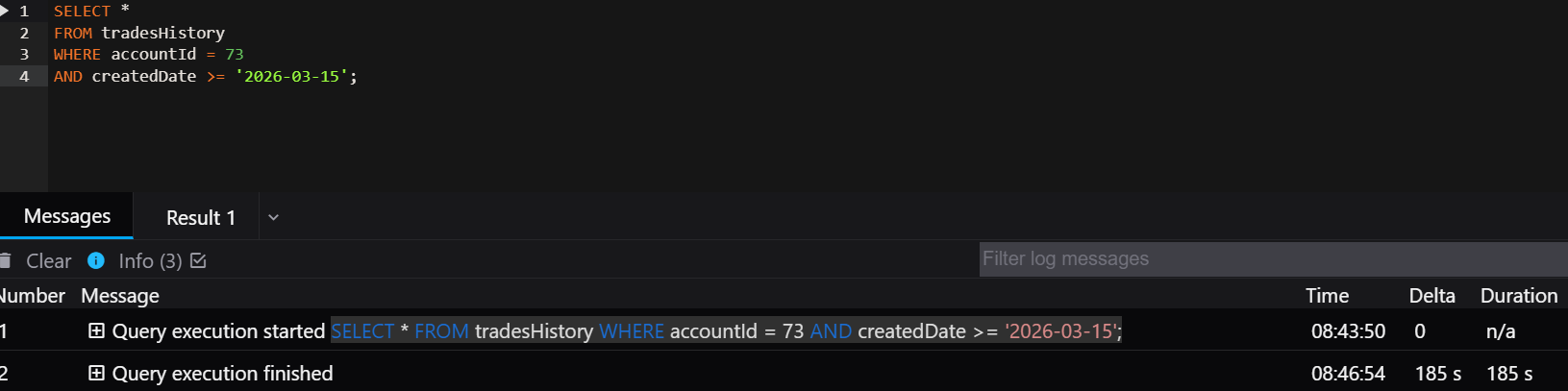
1.Query filters on multiple columns but the index is only on one column.
SELECT *
FROM tradesHistory
WHERE accountId = 73
AND createdDate >= '2026-03-15';
Index Present: CREATE INDEX idx_account ON trades(accountId);
Execution time - 185 sec
Why it’s inefficient
MySQL will:
- Use the index to find rows by accountId
- Then scan those rows to filter createdDate
This causes extra row scans.
Correct index: CREATE INDEX idx_account_createdDate ON trades(accountId, createdDate);
This allows MySQL to filter both columns using the index.
Execution Time - 388 ms

2. Wrong Column Order in Composite Index
In MySQL, column order in a composite index is critical because the optimizer follows the leftmost prefix rule.
This means MySQL can only efficiently use columns starting from the first column of the index.
Query
SELECT *
FROM trades
WHERE accountId = 100
AND tradeDate >= '2026-01-01';
Present index: CREATE INDEX idx_tradeDate_account ON trades(tradeDate, accountId);
Why it's wrong
When MySQL scans this index:
· It first organizes rows by tradeDate
· accountId is only useful after tradeDate filtering
But the query filters by accountId first.
So MySQL must scan many tradeDate values then filter accountId. This often leads to using where and index condition.
Correct index: CREATE INDEX idx_account_tradeDate ON trades(accountId, tradeDate);
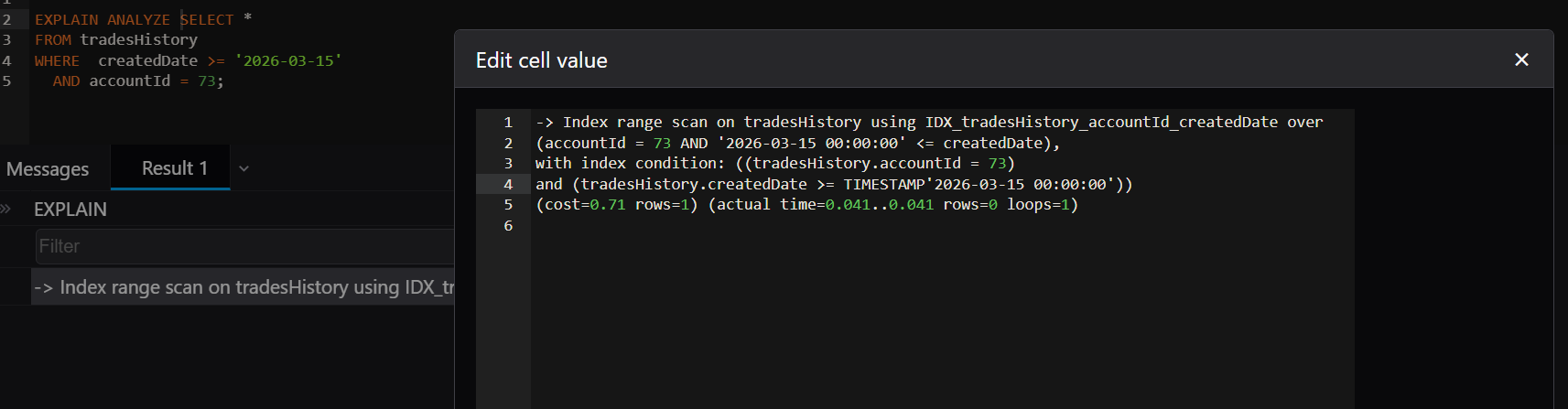
Now MySQL can:
- Jump directly to accountId = 100
- Then filter tradeDate >= '2026-01-01'
Execution becomes faster as rows are fetched by index then scans over the range.
3. Too Many Indexes
Sometimes we add indexes on multiple columns used in searching and joining for every query which often results in
- slower inserts
- slower updates
- higher storage
- optimizer confusion
Design indexes for queries, not tables.
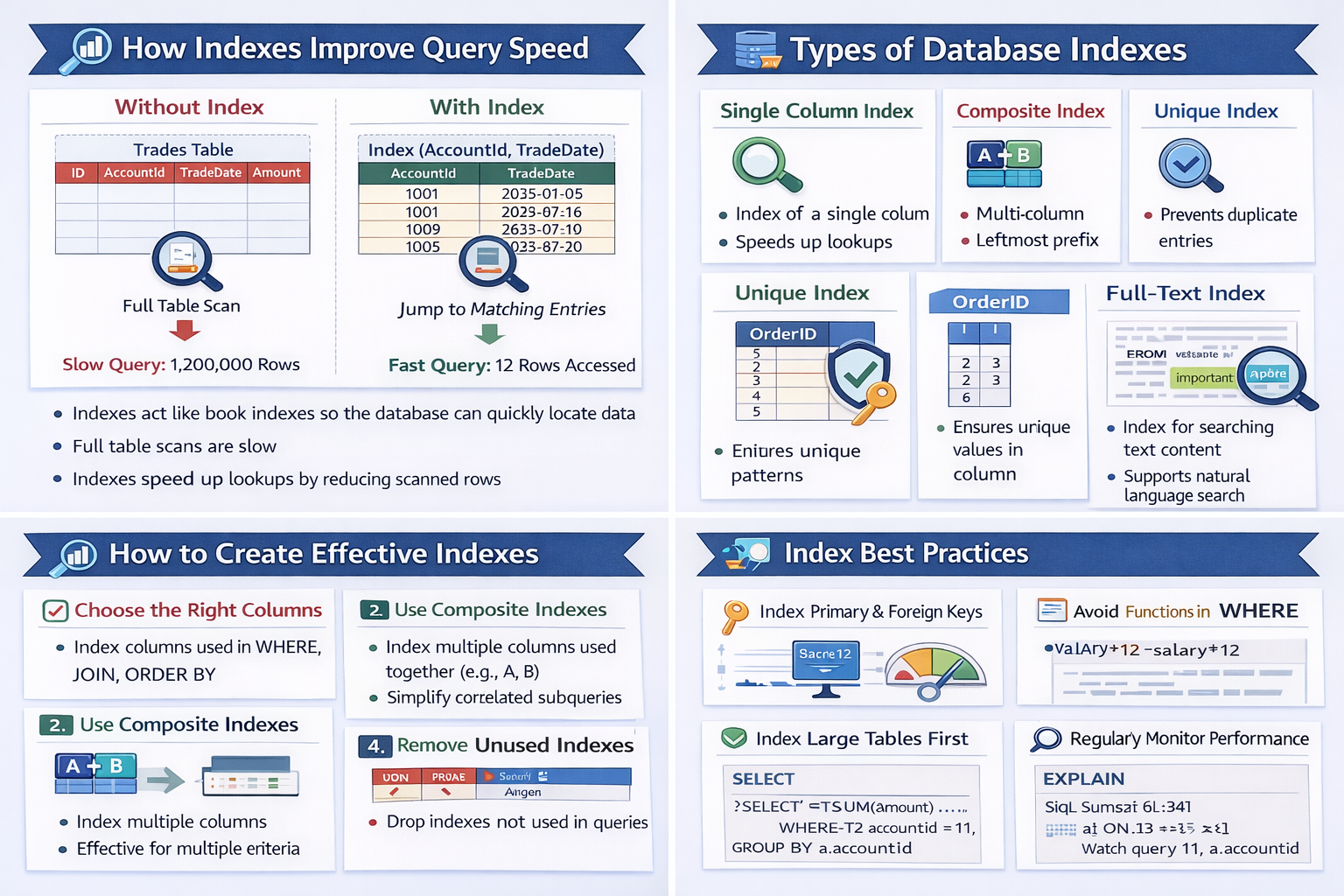
Indexes should be carefully designed for the most common queries. It is only useful if it matches your query pattern.
Reduce Scanned Data
One pattern seen frequently in production systems is the overuse of SELECT *. While it feels convenient during development, it often becomes a hidden performance issue as tables grow larger and begin storing dozens of columns.
Performance issues grow silently with your data.
Retrieving unnecessary columns increases the amount of data that MySQL must process and transfer. This can negatively impact performance in several ways:
· Higher Disk I/O – MySQL must read more data pages from disk.
· More Memory Usage – Larger result sets require more buffer and memory allocation.
· Slower Network Transfer – More data needs to be sent from the database server to the application.
Using SELECT * retrieves all columns from the table, even if most of them are not needed by the application.
 SELECT tradeId,
        quantity,
        price
FROM trades
WHERE accountId = 1001;
This query retrieves only the required columns, which reduces the amount of data MySQL must read, process, and send over the network
Some queries need structural changes.
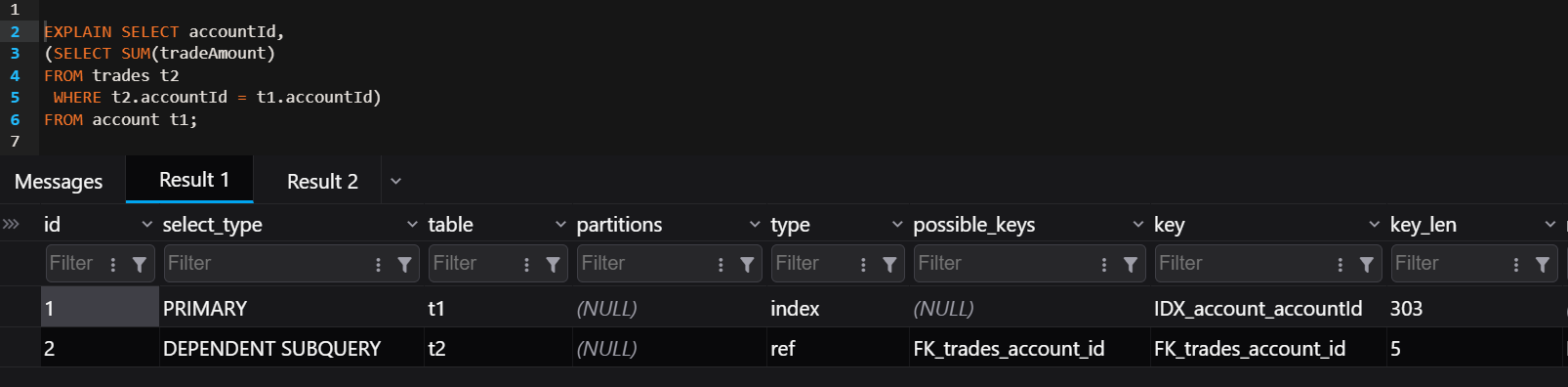
A correlated subquery is a subquery that references a column from the outer query. Because of this dependency, the subquery must be executed once for every row processed by the outer query.
Correlated subqueries hide exponential cost.
When the outer query processes many rows, the subquery is executed repeatedly, which can significantly degrade performance.
SELECT accountId,
       (SELECT SUM(amount)
        FROM trades t2
        WHERE t2.accountId = t1.accountId)
FROM accounts t1;
A correlated subquery runs once for every row of the outer query. If the outer query processes N rows and the inner query scans M rows then the total work become approximately of the time Complexity - O(N × M).
Optimized Version
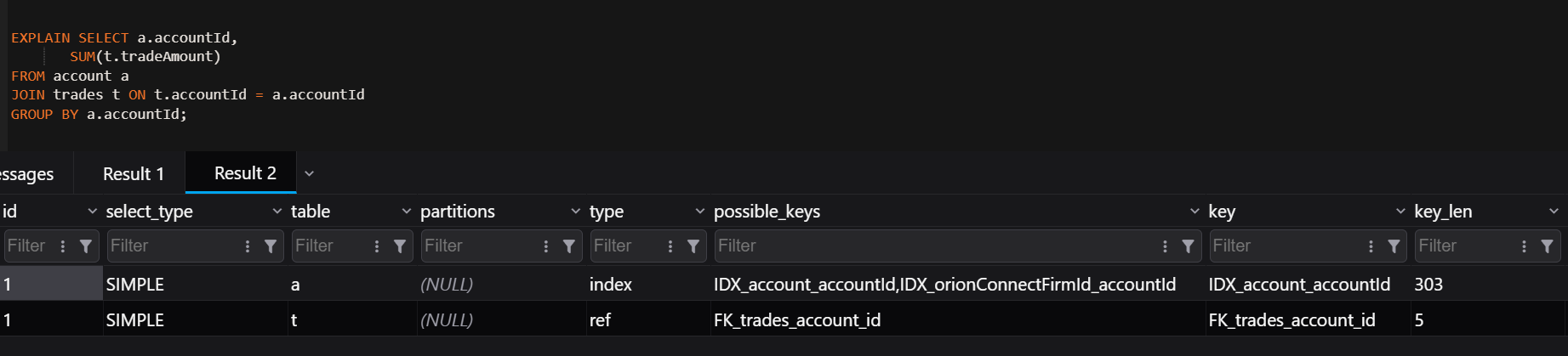
SELECT a.accountId,
       SUM(t.amount)
FROM accounts a
JOIN trades t ON t.accountId = a.accountId
GROUP BY a.accountId;
Why this is faster
· The tables are joined once
· Aggregation happens in a single pass
· MySQL can use indexes efficiently
· The optimizer can create a better execution plan
· Complexity - O(N + M)
Avoid Functions on Indexed Columns
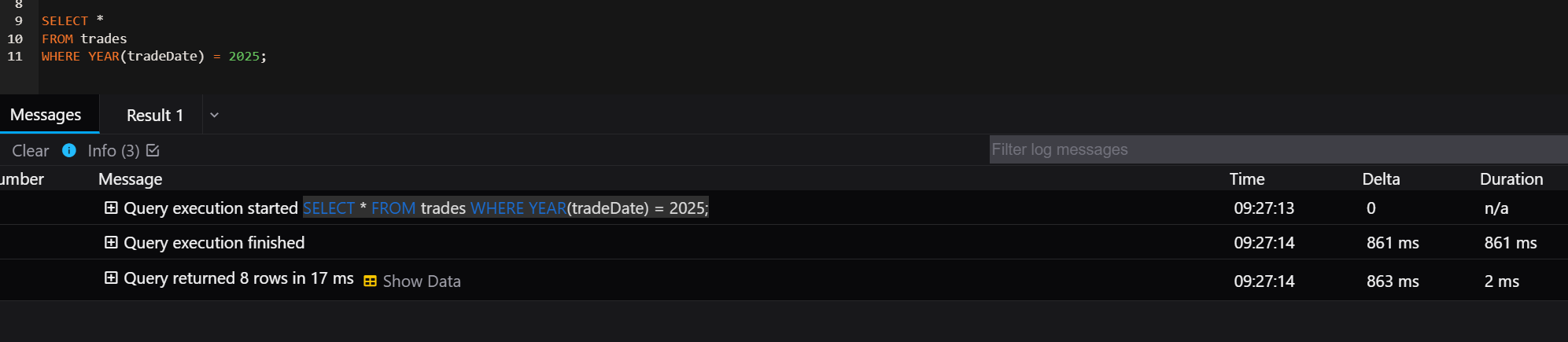
Applying functions to indexed columns prevents MySQL from using the index efficiently. When a function is applied to a column in the WHERE clause, MySQL must compute the function for every row before filtering, which typically results in a full table scan.
SELECT *
FROM trades
WHERE YEAR(tradeDate) = 2026;
Execution Time - 863 ms
Why This Is Inefficient
If an index exists on tradeDate, MySQL cannot use it effectively because the column is wrapped inside the YEAR() function. Instead of using the index to directly locate matching rows, MySQL must evaluate the function for each row in the table.
Functions in WHERE turn indexes useless.
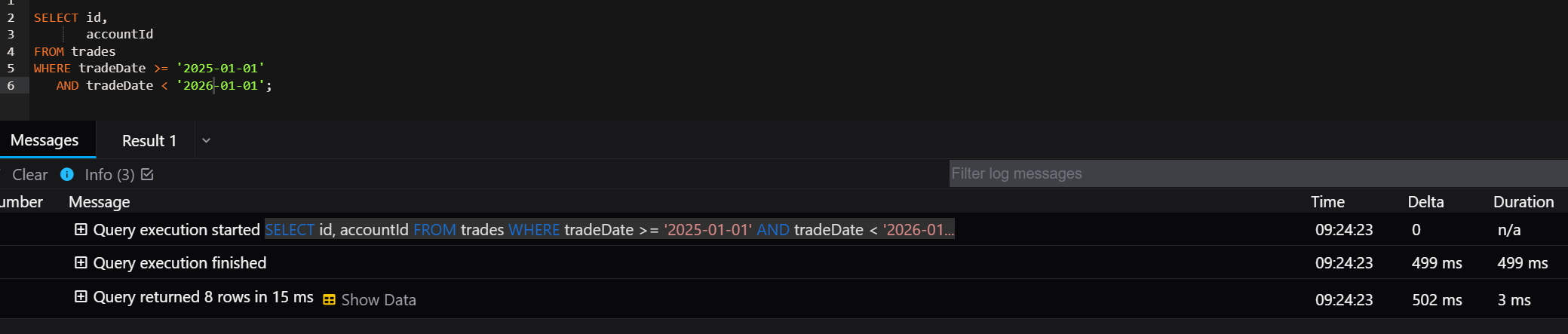
SELECT id,
       accountId
FROM trades
WHERE tradeDate >= '2026-01-01'
  AND tradeDate < '2027-01-01';
Execution Time - 502 ms
Why This Is Better
This query allows MySQL to use the index on tradeDate because the column is used directly in the filter condition. MySQL can perform an index range scan, which is much faster than scanning the entire table.
Filter Early in Joins
When joining large tables, applying filtering conditions helps reduce the number of rows that participate in the join. Processing fewer rows reduces CPU usage, memory consumption, and I/O operations.
SELECT *
FROM trades t
INNER JOIN accounts a ON t.accountId = a.id;
This query joins all rows from both tables before applying any filtering conditions, which can be inefficient when the tables are large.
SELECT t.id,
       t.accountId
FROM trades t
INNER JOIN accounts a ON t.accountId = a.id
WHERE t.tradeDate >= '2026-01-01';
Why This Is Better
Adding a filter condition limits the number of rows from the trades table before they participate in the join. This results in:
· fewer rows being processed in the join
· lower memory usage
· reduced disk I/O
· faster query execution
If an index exists on tradeDate, MySQL can use an index range scan to retrieve only relevant rows.
Keep Statistics Updated
The MySQL optimizer relies on table and index statistics to determine the most efficient execution plan for a query. These statistics help MySQL estimate:
· how many rows match a condition
· the selectivity of indexes
· the cost of different execution plans
Sometimes these statistics become outdated, especially after large numbers of INSERT, UPDATE, or DELETE operations. When this happens, MySQL may choose a suboptimal query plan, such as using the wrong index or performing a full table scan. This command - ANALYZE TABLE trades; updates index distribution statistics so that the optimizer has more accurate information when selecting execution plans.
Why This Helps
Updating statistics allows MySQL to:
· make better estimates of row counts
· choose the most efficient indexes
· generate better execution plans
· improve overall query performance
When to Run ANALYZE TABLE
It is useful to run ANALYZE TABLE when
· a large amount of data has been inserted or deleted
· query performance suddenly degrades
· indexes were recently added or modified
Final Thought
Query performance isn’t about making it work today - it’s about ensuring it still works when your data is 100x bigger.
Over time I’ve learned that writing a query that works is only the first step. The real challenge is writing queries that continue to perform well when the dataset grows from thousands of rows to millions. Thinking about indexes, execution plans, and scalability early in development can prevent many performance issues later.
As applications grow, the volume of data stored in the database typically increases and the number of users or processes interacting with the system also grows. Because of this, MySQL performance issues rarely appear suddenly. Instead, they tend to develop gradually over time. Queries that once executed quickly with smaller datasets may begin to slow down as tables grow larger, indexes become less efficient, and the overall workload on the database increases.
To maintain optimal database performance, it is important to adopt a proactive monitoring and optimization strategy. This includes regularly identifying and reviewing slow-running queries, which can often be detected through tools such as the MySQL slow query log or application-level monitoring. Once a slow query is identified, analyzing its execution plan using tools like EXPLAIN or EXPLAIN ANALYZE helps reveal how MySQL is accessing the data, which indexes are being used, and whether the query is scanning more rows than necessary.
Based on this analysis, improvements can be made by adding or refining indexes, restructuring queries to reduce unnecessary computations, and ensuring that filtering and joins are performed efficiently. Optimizing query design and maintaining well-structured indexes significantly reduces the number of rows MySQL must scan, which directly improves performance.
By consistently monitoring query behavior and applying thoughtful optimizations as the system grows, organizations can ensure that their MySQL databases continue to deliver reliable and high-performing results even as data volumes and workloads increase.