
Zoneless Change Detection in Angular: Fine-Grained Performance and Reactivity
Angular apps have traditionally relied on Zone.js to automatically detect changes and update the UI. While convenient, this approach can become inefficient in large applications. With the introduction of Signals and zoneless Angular, developers now have precise control over when and how components update.
Here, we’ll dive deep into zoneless state management, its advantages, and practical examples.
Understanding Zone.js and Full App Checks
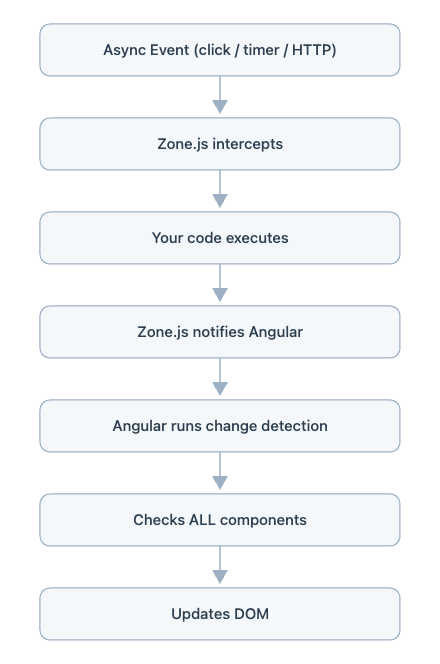
Angular’s default change detection mechanism uses Zone.js, which patches asynchronous operations (like clicks, timers, or HTTP requests) to trigger UI updates.
Full app check means:
Any async event triggers Angular to check every component in the application—even those that don’t use the changed state.
Example:
app.component.ts
import { Component } from '@angular/core';

@Component({
  selector: 'app-root',
  template: `
    <h1>Angular Change Detection Demo</h1>
    <app-header></app-header>
    <app-main></app-main>
    <app-footer></app-footer>
  `
})
export class AppComponent {}
main.component.ts
import { Component } from '@angular/core';

@Component({
  selector: 'app-main',
  template: `
    <h2>Main Component</h2>
    <p>Count: {{ count }}</p>
    <button (click)="increment()">Increment</button>
  `
})
export class MainComponent {
  count = 0;

  increment() {
    this.count++;
  }
}
Clicking a button to increment the count triggers change detection on all components, even if only MainComponent depends on the count.
Diagram – Zone.js Full App Check:
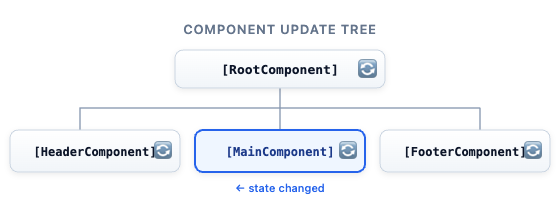
Legend: 🔄 = component checked/updated
Drawback: Unnecessary checks in large apps → performance issues.
1. What does “patches async operations” mean?
Zone.js “wraps (monkey-patches)” browser APIs like:
- `addEventListener` (clicks)
- `setTimeout`/`setInterval`
- `fetch`/XMLHttpRequest (HTTP calls)
- Promises
“Patching” means: It “intercepts these operations” and adds its own logic before/after they run.
Example (Without Zone.js)
setTimeout(() => {
  this.count++;
}, 1000);- Timer runs
- “count” changes
- Angular doesn’t automatically know → UI may not update
Example (With Zone.js)
setTimeout(() => {
  this.count++;
}, 1000);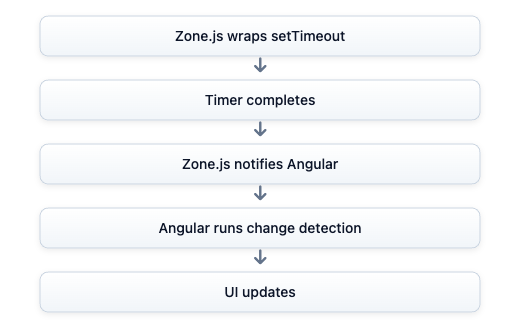
What actually happens behind the scenes: How Zone.js Actually Patches APIs
Example: Patching setTimeout: Original Browser API
setTimeout(() => {
  console.log("Timer done");
}, 1000);
What Zone.js does
It overrides the original function:
const originalSetTimeout = window.setTimeout;
window.setTimeout = function (callback, delay) {
  const wrappedCallback = () => {
    callback();              // run your code
    notifyAngular();         // Zone.js hook
  };
  return originalSetTimeout(wrappedCallback, delay);
};
What’s happening here?
- You call setTimeout
- Zone.js intercepts it
- It wraps your callback
- After your code runs, it calls notifyAngular().
That’s how Angular knows: “Something async just finished! ”
Patching Events
Click example:
button.addEventListener('click', handler);Zone.js wraps it like:
button.addEventListener('click', function (event) {
  handler(event);       // your logic
  notifyAngular();      // trigger change detection
});
Patching for HTTP/Promises
fetch('/api/data').then(response => {
  this.data = response;
});
Internally:
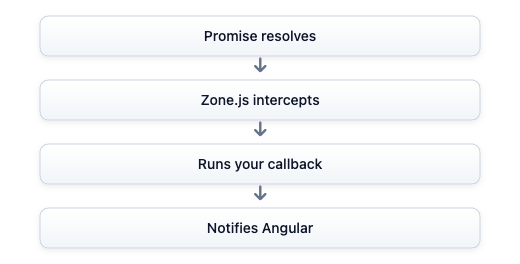
In Nutshell
“Zone.js patches async APIs by wrapping them and adding a hook that notifies Angular when they complete, triggering change detection. In contrast, signals eliminate this need by tracking dependencies and updating only the affected parts of the UI directly.”
2. What does “trigger UI updates” mean?
It doesn’t directly update the DOM. Instead, it tells Angular:
“Hey, something async just finished—better check if anything changed!”
Then Angular:
- Runs “change detection”
- Re-evaluates templates
- Updates DOM if needed
3. Why Angular Needs This
JavaScript is “asynchronous”:
- Events happen anytime
- HTTP calls finish later
- Timers execute later
Angular needs a way to know, "When should I check for UI changes?”
Zone.js answers that automatically
4. Real-Life Analogy
Without Zone.js: You change something in your house, but no one checks if anything needs fixing.
With Zone.js: A smart guard watches everything:
- Timer finished!
- Button clicked!
- API returned!
And says, "Angular, go check the house!”
5. Why This Leads to “Full App Check”
Because Zone.js only knows: “Something happened”
It doesn’t know:
- What changed
- Where it changed
So Angular plays safe: That's why it triggers full app change detection.
Long story short:
“Zone.js intercepts asynchronous operations like events, timers, and HTTP calls, and notifies Angular when they complete, so Angular can run change detection and update the UI automatically.”
Zoneless Angular: Taking Control
Zoneless Angular disables Zone.js, meaning Angular does not automatically detect changes. Developers must explicitly manage UI updates.
How to enable zoneless mode:
// Remove zone.js import in polyfills.ts
// import 'zone.js'; // remove

// Bootstrap Application
bootstrapApplication(AppComponent, {
  providers: [ provideZoneChangeDetection({ noop: true }) ]
});
Now Angular will only update components that explicitly react to state changes.
Signals: Angular’s Modern Reactive System
Signals are reactive state containers that track dependencies. Components using signals automatically update when the signal changes.
No global app check required.
Example:
import { signal } from '@angular/core';
const count = signal(0);
@Component({
  selector: 'app-root',
  template: `
    <h1> {{ count() }} </h1>
    <button (click)="increment()">+</button>
})
export class AppComponent {
  increment() {
    count.update(v => v + 1);
  }
}
Diagram – Zoneless + Signals:
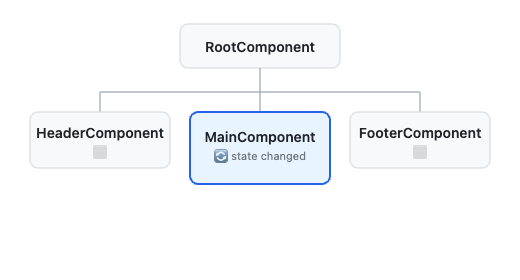
Legend:
🔄 = updated
⬜ = untouched
- Only the components that read the signal are updated.
- Unrelated components remain untouched → fine-grained updates.
Zone.js vs Signals
- Zone.js Flow (Traditional Angular)
Signals Flow (Zoneless Angular)
Using Angular Signals
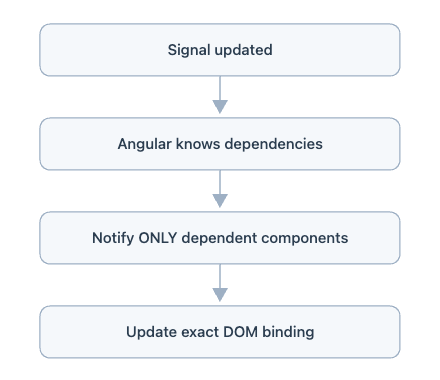
Zone.js => “Event-driven detection”
“Something happened: check everything”
Real-World Analogy: A security guard hears any noise and checks the entire building.
Signals => “State-driven reactivity”
“This changed: update exactly where it’s used”
Real-World Analogy: Smart sensors detect exactly which room changed and update only that room.
Final Takeaway
- Zone.js works by patching async APIs and notifying Angular
- It enables automatic change detection
- But it leads to full app checks
- Signals eliminate the need for this by using dependency tracking
“Zone.js patches async APIs by wrapping them and adding a hook that notifies Angular when they complete, triggering change detection. In contrast, Signals eliminate this need by tracking dependencies and updating only the affected parts of the UI directly.”
Sharing Signals Across Multiple Components
Signals can be shared across components. When updated, only components that read the signal are updated.
Example:
// shared-state.ts

export const count = signal(0);

@Component({ selector: 'comp-a', template: '{{ count() }}' })
export class ComponentA {}

@Component({ selector: 'comp-b', template: '{{ count() }}' })
export class ComponentB {}
Diagram – Single Signal Shared Across Components:
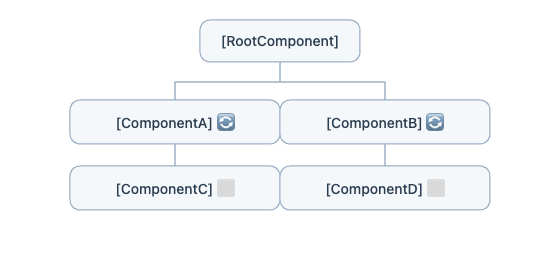
Legend:
🔄 = updated (reads signal)
⬜ = untouched (does not read signal)
- Only ComponentA and ComponentB re-render.
- Components not using the signal remain untouched.
- Performance remains high even as apps grow.
Analogy: Signal = newsletter, components = subscribers. Only subscribers get notified.
Manual Change Detection (Optional)
For edge cases or third-party libraries:
constructor(private cd: ChangeDetectorRef) {}
update() {
  this.cd.detectChanges();
}
Usually not needed with signals, but useful in special cases.
Benefits of Zoneless Angular + Signals
- Performance: Only dependent components update
- Predictable updates: No surprise re-renders
- Better architecture: Encourages reactive design
- Scalable: Works well with large apps
Trade-offs:
- Developer must explicitly manage state
- Learning curve for reactive programming
- Refactoring effort for existing apps
Summary
Takeaway: Zoneless Angular replaces automatic global change detection with precise, signal-driven updates, making large apps fast, predictable, and reactive.
Zone.js vs Signals in Angular: A Performance Comparison
To compare both approaches, consider a simple Angular app:
- Parent component
- 10 child components
- Only 1 child uses shared state
- Button increments a counter
Example Setup (Same for Both Approaches)
We will build:
AppComponent(parent)app-counter(only dynamic component)app-unchange(10 static components)
Let’s define:
- N = 12 → total components
- k = 1 → components that actually change
- C{check} → cost of checking one component
- C{update} → cost of updating DOM
Cost: T = (N ⋅ C{check}) + (k ⋅ C{update})
Performance Speedup: = T{zone} / T{signals}
= (N ⋅ C{check} + k ⋅ C{update}) / k ⋅ (C{check} + C{update})
Efficiency: Useful Work / Total Work
Real-World Cost Example
Assume:
- C{check} = 0.05 ms
- C{update}=0.1 ms
- 1,000,000 interactions/day
1. Zone.js Approach
app.component.ts
import { Component } from '@angular/core';

@Component({
  selector: 'app-root',
  template: `
    <h2>Zone.js Example</h2>

    <button (click)="increment()">Increment</button>

    <!-- 10 static components -->
    <app-unchange></app-unchange>
    <app-unchange></app-unchange>
    <app-unchange></app-unchange>
    <app-unchange></app-unchange>
    <app-unchange></app-unchange>
    <app-unchange></app-unchange>
    <app-unchange></app-unchange>
    <app-unchange></app-unchange>
    <app-unchange></app-unchange>
    <app-unchange></app-unchange>

    <!-- only one dynamic component -->
    <app-counter [count]="count"></app-counter>
  `
})
export class AppComponent {
  count = 0;

  increment() {
    this.count++;
  }
}
app-counter.component.ts
import { Component, Input } from '@angular/core';

@Component({
  selector: 'app-counter',
  template: `Counter: {{ count }}`
})
export class AppCounterComponent {
  @Input() count!: number;
}
app-unchange.component.ts
import { Component } from '@angular/core';

@Component({
  selector: 'app-unchange',
  template: `Unchanged Component`
})
export class AppUnchangeComponent {}
T{zone} = (12 ⋅ C{check}) + (1 ⋅ C{update})
T{zone} = (12 ⋅ 0.05) + (1 ⋅ 0.1) = 0.7 ms
Total = 700,000 ms = 700 sec
Useful Work (changed components) = 1 component
Total Work (checked components) = 12 components
Efficiency = 1 / 12 = 8.33%
Wasted work = Total Work − Useful Work = 12 − 1 = 11 unnecessary checks
2. Signal Approach
app.component.ts
import { Component, signal } from '@angular/core';

@Component({
  selector: 'app-root',
  template: `
    <h2>Signals Example</h2>

    <button (click)="increment()">Increment</button>

    <!-- 10 static components -->
    <app-unchange></app-unchange>
    <app-unchange></app-unchange>
    <app-unchange></app-unchange>
    <app-unchange></app-unchange>
    <app-unchange></app-unchange>
    <app-unchange></app-unchange>
    <app-unchange></app-unchange>
    <app-unchange></app-unchange>
    <app-unchange></app-unchange>
    <app-unchange></app-unchange>

    <!-- only reactive component -->
    <app-counter [count]="count()"></app-counter>
  `
})
export class AppComponent {
  count = signal(0);

  increment() {
    this.count.update(v => v + 1);
  }
}
app-counter.component.ts
import { Component, Input } from '@angular/core';

@Component({
  selector: 'app-counter',
  template: `Counter: {{ count }}`
})
export class AppCounterComponent {
  @Input() count!: number;
}
app-unchange.component.ts
import { Component } from '@angular/core';

@Component({
  selector: 'app-unchange',
  template: `Unchanged Component`
})
export class AppUnchangeComponent {}T{signals} = k ⋅ C{check} + k ⋅ C{update} = k ⋅ (C{check} + C{update})
Since, with signals, Angular updates only components that depend on changed states. Therefore, k = 1.
T{signals} = (1 ⋅ C{check}) + (1 ⋅ C{update}) = (C{check} + C{update})
T{signals} = (1 ⋅ 0.05) + (1 ⋅ 0.1) = 0.15 ms
Total = 150,000 ms = 150 sec
Useful Work (changed components) = 1 component
Total Work (checked components) = 1 components
Efficiency = 1 / 1 = 100%
Wasted work = Total Work − Useful Work = 1 − 1 = 0 unnecessary checks
Side-by-Side Comparison
|
Components checked |
( N ) |
( k ) |
|
Components updated |
( k ) |
( k ) |
|
Time formula |
N · C{check} + k · C{update} |
k · (C{check} + C{update}) |
|
Complexity |
O(N) |
O(k) |
Savings = T{zone} - T{signals} = 700 − 150 = 550 sec/day
Performance Speedup: = T{zone} / T{signals} = 700 / 150 = 4.67 times.